


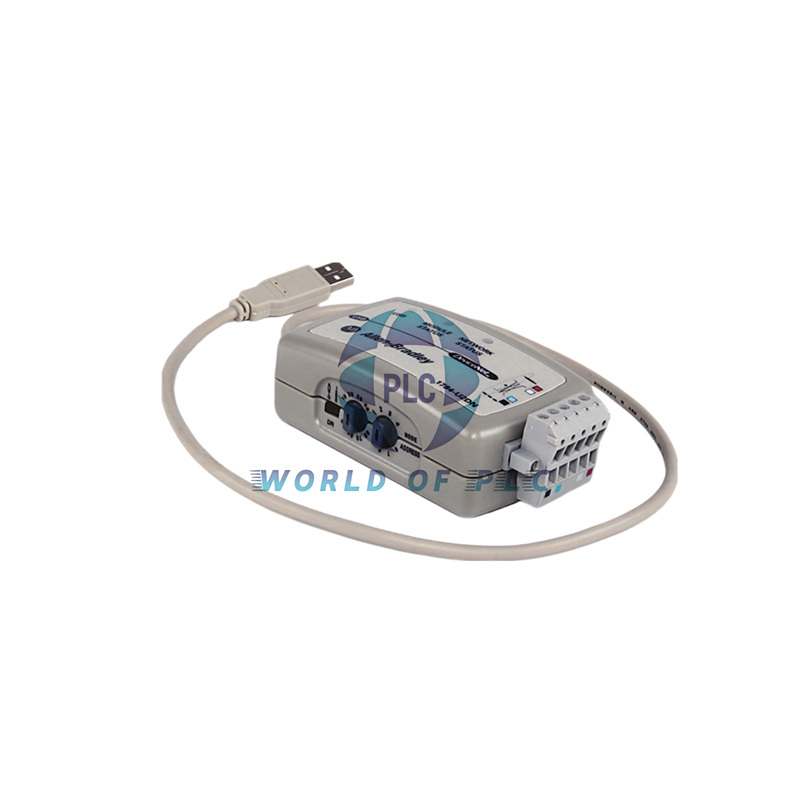


Product Insight – 1784-U2DN USB to DeviceNet Cable
The 1784-U2DN is a USB to DeviceNet communication cable from Allen-Bradley. It connects a PC’s USB port to a DeviceNet network. This cable supports data rates of 125, 250, and 500 kbps. It is USB powered and includes a node address selector switch.
Technical Specifications
- Part Number: 1784-U2DN
- Series: PLC 5
- Length: 0.61 meters
- Data Rates: 125, 250, 500 kbps (selectable)
- USB Supply: 5V DC at 70 mA
- DeviceNet Supply: 24V DC at 75 mA
- Power Consumption: 0.5 W
- Enclosure Rating: IP20
- Weight: 0.23 lbs
- Certifications: C-Tick, CE, KC, UL
Installation & Key Features
- Install the cable driver on your computer before use.
- Use the data rate switch to set communication speed.
- If auto-detection fails, the cable defaults to 125 kbps.
- Node address selector switch allows easy addressing.
- Includes blue/red LED for network and module status.
- Mounting unit included for secure installation.
Compatible Devices & Applications
- Connects a PC to DeviceNet networks.
- Works with PLC 5 and other DeviceNet-enabled controllers.
- Ideal for configuration, monitoring, and diagnostic tasks.
- Suitable for temporary or permanent connections.
- Use with RSLogix 5 and RSNetWorx for DeviceNet.
Expert FAQ – 5 Practical Questions
- Q: Can I use this cable with a DeviceNet network that has a different baud rate?
A: Yes, you can manually set the data rate to 125, 250, or 500 kbps using the switch. If the network rate is unknown, the cable auto-detects it, with a fallback to 125 kbps. - Q: What does the blue/red LED indicate?
A: The LED shows module status, network activity, self-test, and standby mode. Refer to the manual for specific blink codes during troubleshooting. - Q: Is this cable compatible with Windows 10 or 11?
A: Yes, but you must install the correct driver. We recommend using the latest driver from Rockwell Automation’s website for full compatibility. - Q: What is the maximum cable length for DeviceNet, and does this cable extend it?
A: The 1784-U2DN is a 0.61m drop cable. It does not extend the trunk length. For longer distances, use standard DeviceNet trunk cables and taps. - Q: Can I power the DeviceNet side from the USB port?
A: No. The DeviceNet side requires a separate 24V DC supply at 75 mA. The USB port only powers the cable’s internal electronics.


Reviews
There are no reviews yet.