


Troubleshooting ABB 07KT97 CPU: Solving “EPROM Checksum Error”
Understanding the 07KT97 Checksum Failure
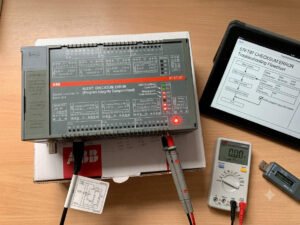
The ABB 07KT97 (GJR5253000R0200) CPU unit is a robust controller within the AC31 PLC family. However, field engineers occasionally encounter a flashing “ERR” LED accompanied by an “EPROM Checksum Error” in the 907 AC 1133 programming software. At Oiltech Controls Limited, our experience shows that this alarm does not always signal the end of the module’s life. In fact, over 70% of these cases are recoverable through logical troubleshooting and systematic memory restoration.
Why Checksum Errors Occur in PLC Systems
The EPROM Checksum Error indicates that the CPU detected a mismatch between the stored program data and the original validation value during startup. Several factors contribute to this condition in aging industrial automation environments:
- ✅ Thermal Stress: Prolonged operation in cabinets exceeding 55°C accelerates memory degradation.
- ⚙️ Power Instability: Voltage spikes during machine power-up can corrupt memory sectors during read/write cycles.
- 🔧 Component Aging: After 15+ years of service, the data retention capabilities of EPROM chips naturally decline.
- 🔍 Battery Depletion: Failure of the backup battery can lead to data loss in RAM or related storage areas.
Step-by-Step Recovery Logic
Before opting for a costly hardware replacement, follow this professional diagnostic sequence to determine if your 07KT97 can be revived:
- Verify Communication: If the 907 AC 1133 software can identify the CPU hardware version, the core logic circuitry is likely intact.
- Clear and Restore: Upload existing diagnostic logs, clear the corrupted user memory, and perform a fresh download of your backup project.
- Check Power Quality: Use an oscilloscope to ensure your 24VDC supply is clean and free from transient spikes.
- Inspect the Battery: Test the backup battery voltage; if it is below 3V, replace it immediately to prevent future data corruption.
Author Insights on Industrial Reliability
At Oiltech Controls Limited, we maintain that proactive documentation is the best defense against PLC downtime. Many controllers are permanently retired simply because the original project files or EPROM images were lost. We strongly recommend that every site maintains a current digital library of all PLC programs and parameter databases. Furthermore, if you are operating legacy AC31 systems, investing in simple cabinet cooling solutions can significantly extend the life of your electronic components. Treat your legacy controllers with care, and they will continue to serve your facility for years to come.
Frequently Asked Questions (FAQ)
Q: Is a checksum error always a sign of a dead CPU board?
A: No. It is often a software-level or memory-level issue. If the communication port is responsive, the probability of successful recovery is very high.
Q: Should I replace the backup battery while the PLC is powered on?
A: Yes, if your system configuration permits it. This prevents the loss of volatile memory and avoids creating a new “checksum error” during the battery swap.
Q: What should I do if the CPU still errors after a fresh program download?
A: This usually suggests the EPROM chip itself has lost its ability to hold data. In this scenario, professional board-level repair or replacing the memory module is the required next step.
Are you facing persistent errors with your legacy ABB AC31 control systems? At Oiltech Controls Limited, we specialize in technical support and high-quality spare parts for industrial automation platforms. Whether you need an urgent replacement or help recovering critical program data, our expert team is here to assist. Visit our website today to explore our full inventory and service solutions.






%20CPU%20unit%20is%20a%20robust%20controller%20within%20the%20AC31%20PLC%20family.%20However,%20field%20engineers%20occasionally%20encounter%20a%20flashing%20“ERR”%20LED%20accompanied%20by%20an%20“EPROM%20Checksum%20Error”%20in%20the%20907%20AC%201133%20programming%20software.%20At%20Oiltech%20Controls%20Limited,%20our%20%5B…%5D&media=https://www.oiltechcontrols.com/wp-content/uploads/2026/06/ABB-07KT97-Checksum-Error-Troubleshooting-Guide_.jpg)