Top 10 RX3i PACSystem Fault Codes: Diagnosis and Solutions
Industrial automation systems demand reliable performance from PAC controllers. The Emerson RX3i PACSystem manages critical manufacturing processes. Understanding common fault codes prevents costly downtime. This guide provides expert troubleshooting for control system professionals.
Fault Code 8101: Hardware Configuration Mismatch
This error indicates physical hardware conflicts. Module types or positions don’t match software configuration. The system detects missing or incorrect modules. Therefore, compare physical layout with Proficy Machine Edition settings. Verify all module types and slot assignments precisely.
Fault Code 8102: Module Communication Failure
Modules stop responding to CPU commands. Check status indicators on affected modules. Power cycling often resolves temporary issues. Furthermore, inspect backplane connections for damage. Replace faulty modules if problems persist.
Fault Code 8103: CPU Hardware Malfunction
This serious fault indicates processor failure. Isolate the CPU by removing other modules first. Test with minimal configuration. If errors continue, replace the CPU module immediately. Always maintain proper system grounding.
Fault Code 8201: Power Supply Failure
Power units provide critical system voltage. Check input power quality and stability. Monitor power supply status indicators. Replace failing units promptly to prevent system-wide issues.
Fault Code 8202: Backplane Communication Error
Backplane issues disrupt module communication. Power down the entire system completely. Reseat all modules firmly in their slots. Additionally, inspect for bent pins or connector damage.
Fault Code 8301: Program Execution Overrun
Logic execution exceeds time limits. Complex routines cause sweep time violations. Optimize program structure and logic flow. Alternatively, adjust sweep time settings cautiously.
Fault Code 8401: Internal Memory Failure
Memory corruption affects program execution. Backup current configuration immediately. Clear memory and reload the application. Replace CPU if memory errors continue appearing.
Fault Code 8501: Ethernet Network Issues
Network connectivity problems disrupt communications. Verify physical cable connections first. Check network switch status and configuration. Confirm IP settings match network requirements.
Fault Code 8502: Serial Port Communication Error
Serial device connections fail unexpectedly. Inspect cable integrity and wiring connections. Verify baud rate and protocol settings. Test ports with known working devices.
Fault Code 8601: I/O Configuration Error
I/O points are configured but not enabled. Review I/O configuration in programming software. Ensure all used points are properly mapped. Download corrected program to clear the fault.
Industry Context and Impact
Manufacturing downtime costs average $260,000 hourly. According to ARC Advisory Group, control system failures cause 42% of unplanned stops. Proper troubleshooting reduces recovery time significantly. Companies with trained staff resolve issues 60% faster.
Preventative Maintenance Strategies
- Monitor CPU utilization and memory usage regularly
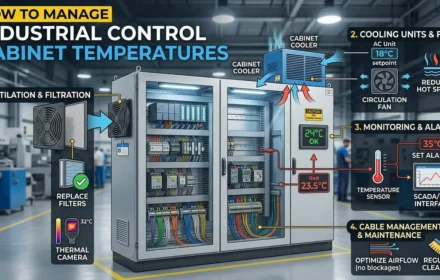
- Maintain stable operating temperatures in control cabinets
- Implement quality surge protection for power supplies
- Schedule regular system diagnostics and health checks
- Keep firmware and software versions current
- Maintain comprehensive system documentation
Packaging Line Case Study
A high-speed packaging system experienced frequent sweep time faults. Engineers optimized HMI communication blocks effectively. They moved data logging to lower priority tasks. Consequently, sweep time reduced by 40%. Production quality improved immediately.
Expert Analysis from World of PLC
At World of PLC, we’ve resolved thousands of PAC system faults. Most issues stem from preventable causes. Proper industrial automation maintenance requires systematic approaches. We recommend creating custom diagnostic routines for critical processes. Documenting previous fault resolutions accelerates future troubleshooting. Regular training ensures staff readiness for emergency situations.
Implementation Recommendations
Develop standardized troubleshooting procedures for common faults. Maintain spare modules for critical system components. Create detailed system documentation and wiring diagrams. Establish regular maintenance schedules and checklists. Train multiple staff members on fault resolution procedures.
Frequently Asked Questions
- What’s the first step when multiple faults appear simultaneously? Start by checking power supply quality and system grounding, as these often cause cascading failures.
- How can we prevent configuration mismatch errors during maintenance? Always perform complete system backups before any hardware changes and verify configurations after module replacements.
- What tools are essential for effective PAC system troubleshooting? Beyond programming software, maintain network testers, multimeters, and known-good spare modules for quick diagnostics.
| Model | Title | Link |
|---|---|---|
| IC694ACC300 | GE Fanuc RX3i Discrete Input Module | Learn More |
| IC694CHS392 | GE Fanuc Emerson RX3i Expansion Base | Learn More |
| IC670ALG320 | GE Fanuc Field Control Analog Output Module | Learn More |