


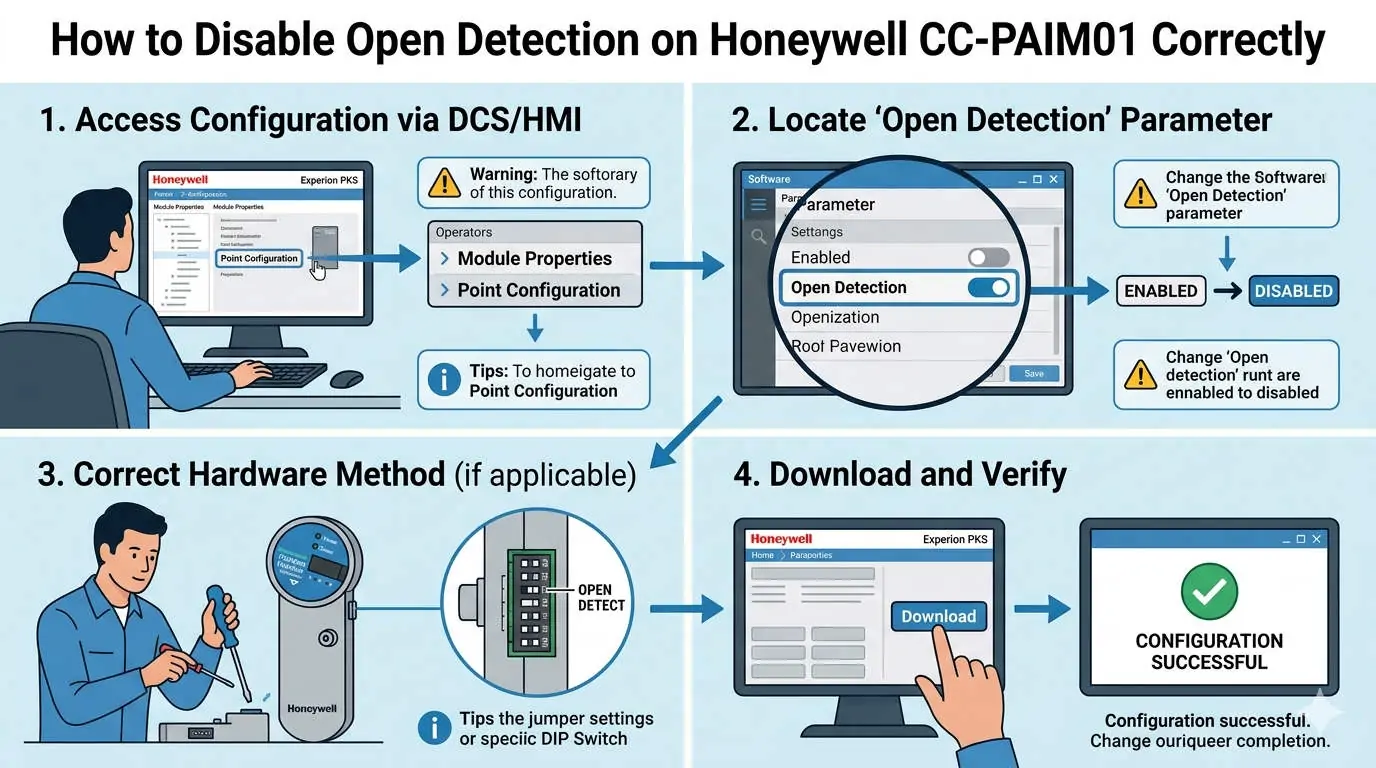
Managing Open Detection in Honeywell CC-PAIM01: Balancing Reliability and Stability
The Operational Value of Fault Identification in Industrial Automation
The Honeywell CC-PAIM01 analog input module features a robust open detection (line break) function to enhance signal integrity. This feature identifies wiring faults in real-time by monitoring loop continuity. However, in specific industrial automation scenarios—such as simulation testing or redundant sensor applications—this feature can trigger nuisance alarms. Therefore, engineers must decide when to disable or mask this detection to maintain process stability. For sectors like oil, gas, and chemicals, ensuring alarm integrity directly impacts overall production safety and uptime.
Technical Logic Behind Signal Interpretation and Fault Thresholds
The CC-PAIM01 module typically identifies an open circuit when the input current falls below a specific threshold, usually 3.6 mA. By disabling this function within the Honeywell Experion PKS software, the DCS (Distributed Control System) stops flagging low current as a hardware fault. Consequently, this prevents false trips during sensor maintenance. However, engineers must then rely on secondary validation logic to monitor loop health, as the system no longer provides automated wire-break alerts.
Differentiating Alarm Masking from Hardware Behavior
Disabling open detection only changes how the software interprets data; it does not alter the physical input circuit. The module continues to read raw signal values, including those near zero. As a result, control strategies must include “Bad PV” (Process Variable) substitution logic to prevent invalid data from propagating into PID loops. Experts at Oiltech Controls Limited suggest implementing software clamping to ensure that a disconnected wire does not cause an unexpected control action.
Safety Compliance and IEC 61508 Standards
In safety-critical systems, open detection contributes to the diagnostic coverage required for specific SIL (Safety Integrity Level) ratings. Disabling these diagnostics may reduce the safety performance of the loop. According to IEC 61511 standards, any change to diagnostic behavior requires a thorough evaluation during HAZOP or LOPA studies. Therefore, always document these configuration changes in the control philosophy to ensure long-term compliance and transparency for maintenance teams.
Field Experience: When to Bypass Open Detection
From our extensive field experience at Oiltech Controls Limited, we commonly disable open detection during specific phases. This includes loop simulations with signal generators where constant alarms would hinder testing. Furthermore, non-standard transmitters that operate below 4 mA under normal conditions often require this adjustment. However, a common field issue involves engineers forgetting to re-enable detection after commissioning. This oversight leaves the system vulnerable to undetected wiring failures during normal operations.
Configuration Methods in Honeywell Experion PKS
To adjust these settings, navigate to the I/O channel configuration in Control Builder or Quick Builder. Locate the “Input Fault Detection” parameter and set it to “Disabled” or adjust the alarm masking settings. Instead of a full disable, consider using alarm suppression timers. This approach balances noise reduction with necessary fault visibility, providing a more nuanced control environment for complex factory automation tasks.
Author Insights from Oiltech Controls Limited
At Oiltech Controls Limited, we believe that “diagnostic silence” is often as dangerous as a false alarm. While disabling open detection solves immediate nuisance issues, it shifts the burden of proof to the maintenance team. We recommend a hybrid strategy: disable detection only for non-critical monitoring points and maintain strict hardware diagnostics for all safety-related interlocks. This ensures both operational flexibility and rigorous safety standards.
For more technical guides and high-quality Honeywell automation components, visit Oiltech Controls Limited to explore our comprehensive range of DCS and PLC solutions.
Technical Best Practices Checklist
- ✓ Verification: Periodically verify loop current with a high-precision multimeter if software detection is disabled.
- ✓ Wiring Integrity: Use shielded twisted-pair cables to minimize EMI-induced false low signals.
- ✓ Documentation: Record all software masking in the site-specific maintenance manual.
- ✓ Grounding: Ensure single-point grounding to prevent noise from fluctuating near the fault threshold.
Frequently Asked Questions (FAQ)
Q1: Does disabling open detection affect the accuracy of my 4-20 mA signal?
No, it does not change the analog-to-digital conversion accuracy. It only prevents the system from generating a “Fault” status when the signal drops below the 3.6 mA threshold. Your process variable will still be recorded based on the actual current received.
Q2: Can I use CC-PAIM01 to replace older Honeywell modules without hardware changes?
Generally, yes. The CC-PAIM01 is designed for compatibility within the Experion architecture. However, you must verify the default alarm thresholds and firmware versions, as newer modules often have more granular diagnostic settings than legacy versions.
Q3: What is the risk of leaving open detection disabled permanently?
The primary risk is an “unannounced failure.” If a wire breaks or a transmitter fails, the DCS might interpret the 0 mA signal as a valid process value (e.g., 0% level). This could lead to tank overflows or equipment damage because the system no longer alerts you to the broken connection.
Solution Scenario: Redundant Sensor Configurations
In a high-pressure steam application, a client utilized redundant sensors where a voting logic (2oo3) determined the final action. By masking open detection on individual channels, they prevented a single faulty wire from triggering a full system shutdown. Instead, the logic identified the “Bad PV” and alerted the operator without tripping the process, illustrating a perfect balance between hardware diagnostics and software-level voting.







%20function%20to%20enhance%20signal%20integrity.%20This%20feature%20identifies%20wiring%20faults%20in%20real-time%20by%20monitoring%20loop%20continuity.%20However,%20in%20specific%20industrial%20automation%20scenarios—such%20as%20%5B…%5D&media=https://www.oiltechcontrols.com/wp-content/uploads/2026/04/How-to-Disable-Open-Detection-on-Honeywell-CC-PAIM01-Correctly.webp)